 Millworker
 Hole Types
Your own list of holes: their sizes in mm, a cross-section of each, and the fastener that goes in it.
- Fasteners or Hardware panel → Hole Types (also with nothing open).
- Edit holes… in Place Hole, Hole types… in Confirmat and the Hardware Library.
A hole type is a named hole: Place Hole and Confirmat cut it. A set to start with is there the first time (Confirmat 7×50, dowels, shelf pins, a line bore, a hinge cup, Minifix, a countersunk screw, inserts, a through bolt); change or delete them as you like.
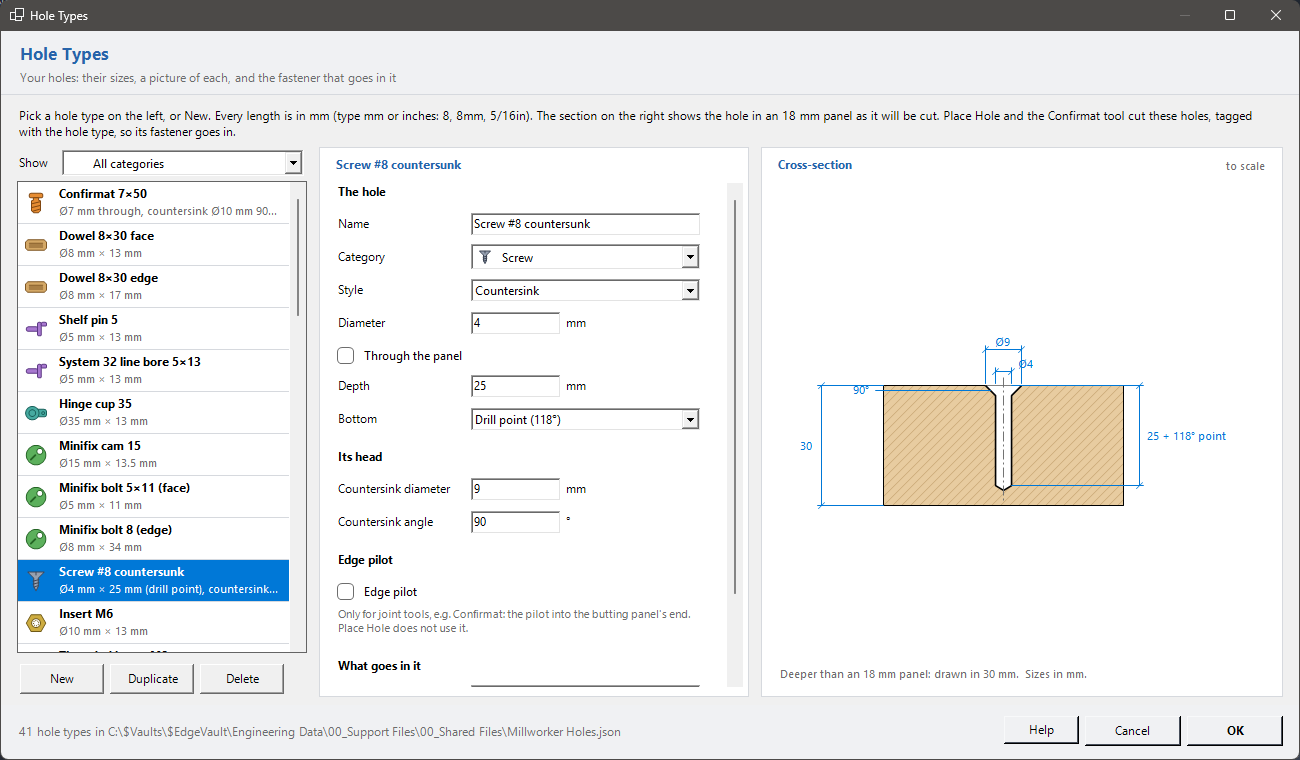
The list
Each row has its category's icon. Show filters by category. New, Duplicate and Delete are under it. Holes already cut keep their size when a hole type is deleted.
The fields
Every length is in mm, shown beside each box. Type mm or inches: 8, 8mm, 5/16in.
| Name, Category | What the tools list, and its icon. |
| Style | Plain (drilled), Counterbore (a wider step at the face, for a bolt's head) or Countersink (a cone at the face, for a screw's head). |
| Diameter | The hole's diameter. |
| Through the panel | Ticked: through. Else blind, to the Depth (from the face to the end of the full diameter), with a Flat or Drill point (118°) bottom. |
| Its head | Counterbore diameter and depth, or countersink diameter and angle (90° for most wood screws). |
| Edge pilot | Only for joint tools such as Confirmat: the pilot's diameter and depth into the butting panel's end. Place Hole does not use it. |
The cross-section
The selected hole drawn to scale in a panel (18 mm), with its sizes. It changes as you type, so you can see the hole before you cut it.
What goes in it
| Fastener | The part from the Hardware Library that goes in this hole, or (none). Place Hardware puts it in every hole of this type. Insert Fastener can set it for you (Remember for this hole type). |
| Needs a fastener | Ticked: the hole normally gets a part (a screw, dowel, cam, hinge). Unticked: left empty (shelf pins fitted later, a line bore). An empty hole type with no fastener gets nothing from Place Hardware. |
OK saves. A hole type that is not ready (a countersink narrower than the hole, a blind hole with no depth) says why. The list is kept in Millworker Holes.json beside the hardware library.